> ## Documentation Index
> Fetch the complete documentation index at: https://docs.cryptoprocessing.com/llms.txt
> Use this file to discover all available pages before exploring further.
# Design a crypto payment form
Here are some tips for creating a convenient payment form for customers on your site.
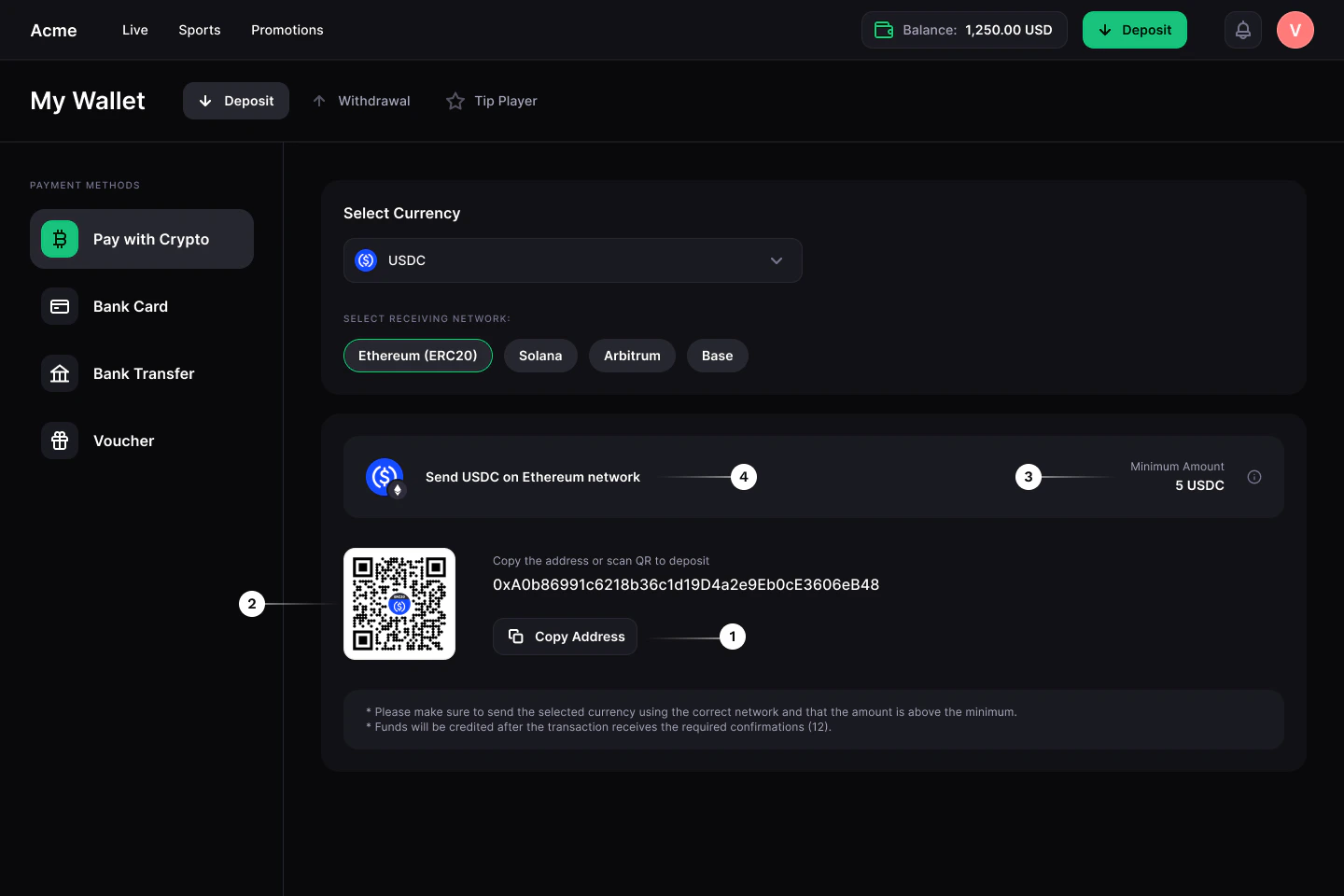
To make it easier for your customers to make deposits, add a **Copy address** button to your payment form.
We recommend that you generate a QR code with the crypto address. This way, your customer will be able to scan the QR code with their phone and pay in their wallet app. CryptoProcessing does not generate address QR codes automatically, but you can use any tools you prefer.
Deposits under the minimum amount will not be recognised and credited by CryptoProcessing. Make sure your customers can clearly see the minimum deposit amount on the payment form.
For more information on minimum deposit amounts, see [Confirmations and limits](/reference/confirmations-and-limits).
If your customer sends a deposit in the wrong currency or on the wrong network, their crypto can be lost or difficult to recover. We recommend highlighting the address's currency and network, as well as the minimum deposit amount, on your payment form.
For more details on how to handle cross-chain deposits, see [Handle deposits sent in the wrong currency](/getting-started/cross-currency).